Your perps portfolio
You need a connected Kalshi account for this page. Why?
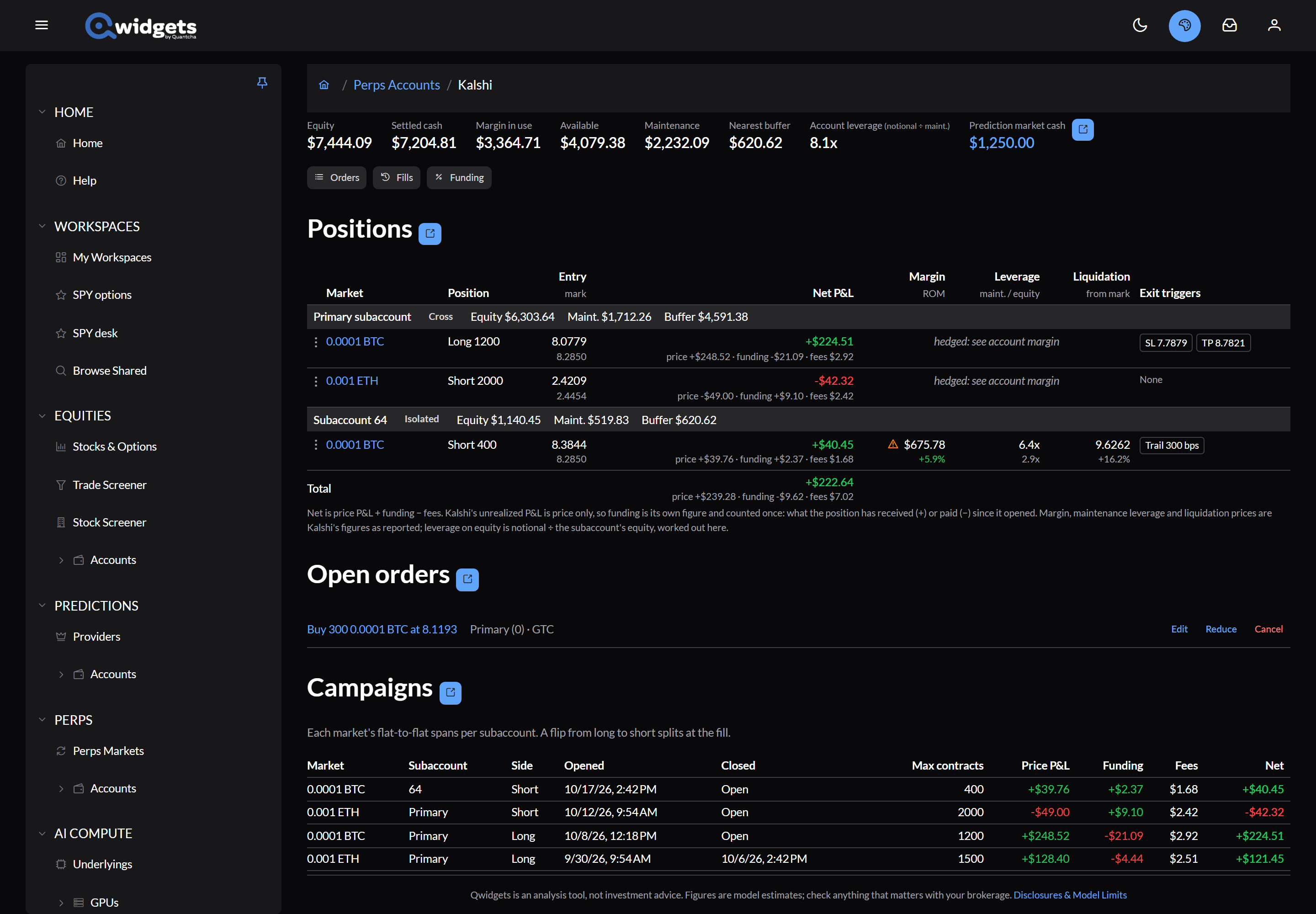
With a Kalshi account connected, Accounts under Perps in the left-hand menu lists it. Its page shows your perps balances, every position in every subaccount, your open orders, and how each campaign went. See Kalshi account to connect one.
If Kalshi hasn’t turned perps on for your account, the page says so instead. Perps are enabled by Kalshi, not in Qwidgets; once Kalshi turns them on, they appear with no change to the connection.
Subaccounts
Kalshi holds perps in subaccounts. The primary subaccount (0) is a cross subaccount: its positions share its margin. Kalshi’s own app opens each position in its own isolated subaccount, numbered 64 and up, with only that position’s margin behind it. Qwidgets reads every subaccount and groups positions by the one they’re in. Each group’s header shows whether it’s isolated or cross, its Equity, its maintenance margin (Maint.), and its Buffer: how much it can lose before liquidation.
Balances
Across the top:
- Equity, Settled cash, Margin in use, Available, and Maintenance, added up over your subaccounts.
- Nearest buffer: the smallest buffer of any subaccount holding positions. Isolated subaccounts are liquidated one at a time, so this is the one closest to it.
- Account leverage (notional ÷ maint.), as Kalshi reports it.
- Prediction market cash, on the same Kalshi account’s event contract side, linked to that portfolio.
Orders, Fills, and Funding open the account’s other pages.
Positions
Each position shows:
- Position: long or short, and the number of contracts.
- Entry and the current mark.
- Net P&L, with its parts beneath it: price P&L, funding, and fees. Kalshi reports price P&L only, so funding is its own line, counted once: what the position has received or paid since it opened. Net is price P&L plus funding, minus fees.
- Margin and ROM, the return on that margin.
- Leverage, two ways: notional ÷ maintenance margin, as Kalshi’s API reports it, and beneath it notional ÷ the subaccount’s equity, the figure Kalshi’s app shows.
- Liquidation: Kalshi’s estimated liquidation price, and how far it is from the mark.
- Exit triggers: any stop-loss, take-profit, or trailing stop on the position.
Margin, maintenance leverage, and liquidation prices are Kalshi’s figures as reported.
Hedged: see account margin. Kalshi can margin a position together with the subaccount’s other positions in its asset class. It then reports no margin, return, leverage, or liquidation price for that position alone, so read the subaccount’s maintenance margin and buffer instead.
A warning beside the margin flags a position that offsets another one held in a different subaccount, such as a long and a short on the same asset opened in two isolated subaccounts. They’re margined separately, so Kalshi gives no hedge credit between them, and either can be liquidated on its own, leaving the other unhedged. Hover over the warning, or open the position’s details on a narrow screen, to see which position it offsets.
The ⋮ beside a position opens Trade, Close position, Add protection or Edit protection, Market page, and Fills. Closing and protecting open the trade page with the ticket or the protection editor ready for that position; see Trade perps.
Campaigns
Campaigns lists each market’s flat-to-flat spans per subaccount: when it opened and closed, its largest size, and its price P&L, funding, fees, and net. A flip from long to short splits into two campaigns at the fill.
Orders, fills, and funding
- Orders: your resting orders, with Edit, Reduce, and Cancel; see Trade perps.
- Fills: every fill, with its price, fees, realized price P&L, and whether it was Maker or Taker.
- Funding: every funding payment, with the position, mark, and rate it was paid at. Positive is received, negative paid.
Widgets
The Perps Positions, Perps Balance, Perps Open Orders, Perps Fills, Perps Funding Payments, and Perps Campaigns widgets show the same on a workspace. The button beside each section of the portfolio adds it to a workspace.