Order
Watch one order, and reprice or cancel it while it’s working. It needs a connected brokerage account; see Brokerage accounts.
What it shows
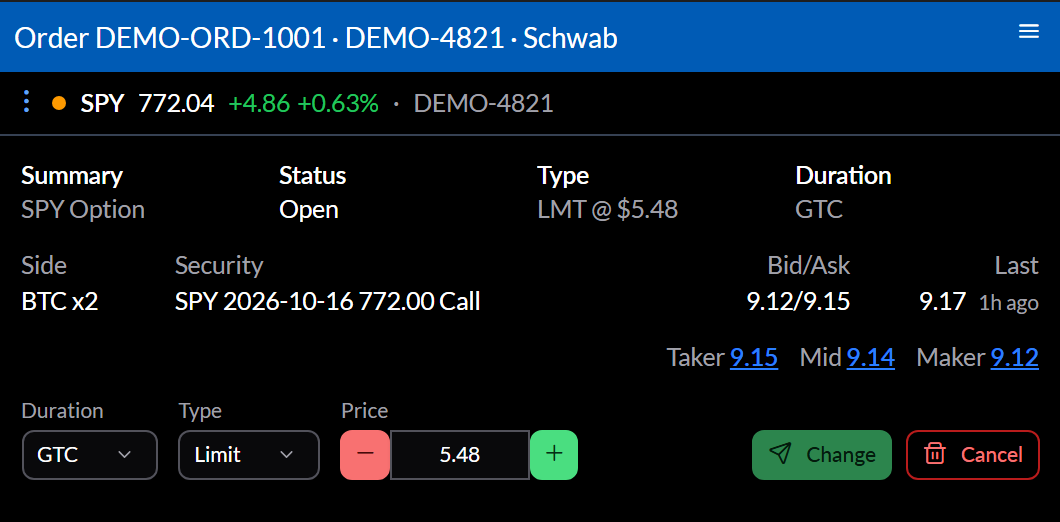
The order’s Summary, Status, Type, and Duration, then each leg with its bid and ask and last trade. Taker, Mid, and Maker prices fill in the price with a click.
While it’s working, change the Duration, Type, or Price (the − and + step a penny) and select Change, or Cancel it after confirming. If the order changes at the brokerage while you’re editing, the widget says so. Once it’s done, the widget says how it ended.
Settings
Configure sets the Brokerage and Account, and Order: the brokerage’s order id. The usual way in is Open Order from the Orders widget, or placing an order from a Trade Ticket, which becomes this widget.
Actions
⋮ opens the symbol in other widgets, Open Orders, and Open Portfolio.