Transactions
The Transactions tab lists the account’s history as the brokerage reports it, newest first: trades, assignments, exercises, expirations, dividends, interest, fees, transfers, splits, and more. Performance and the Campaign Journal are built from it.
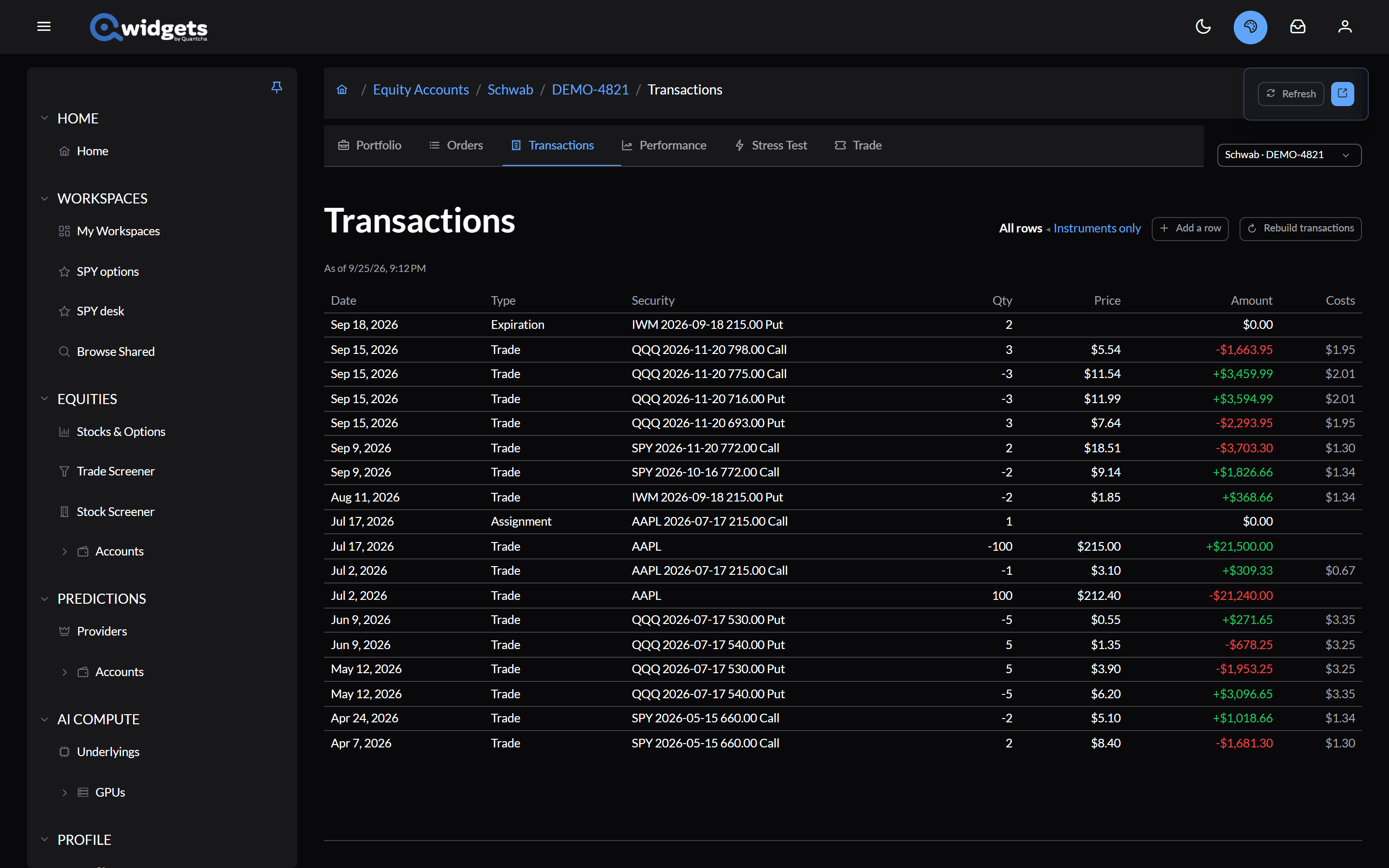
Each row shows the date, type, security, quantity, price, amount, and costs (commission and fees). Hover a type to see the brokerage’s own name for it.
- All rows or Instruments only hides cash-only rows such as interest and transfers.
- Refresh checks the brokerage for new transactions. The line under the heading says when it last did.
- Read older transactions loads further back.
How far back the history reaches, and whether today’s activity appears the same day, depends on the brokerage. See the Coverage Matrix.
When the history is missing something
Brokerages don’t always report everything, such as shares you’ve held since before the history begins, or a split. Add a row adds what’s missing:
- Shares: the underlying, the date, how many shares (negative to remove), and the price per share.
- Split: the underlying, the date, and the new shares per old share.
Your rows are listed under Rows you added, where you can edit or remove them, and are marked as yours wherever they’re used.
Rebuild transactions reads the whole history from the brokerage again and removes rows it no longer reports. Your notes on campaigns are kept.