Calendar search
The Calendar tab searches spreads that pair a near expiration with a later one, calendars and diagonals, across every pair of expirations that fits your rules.
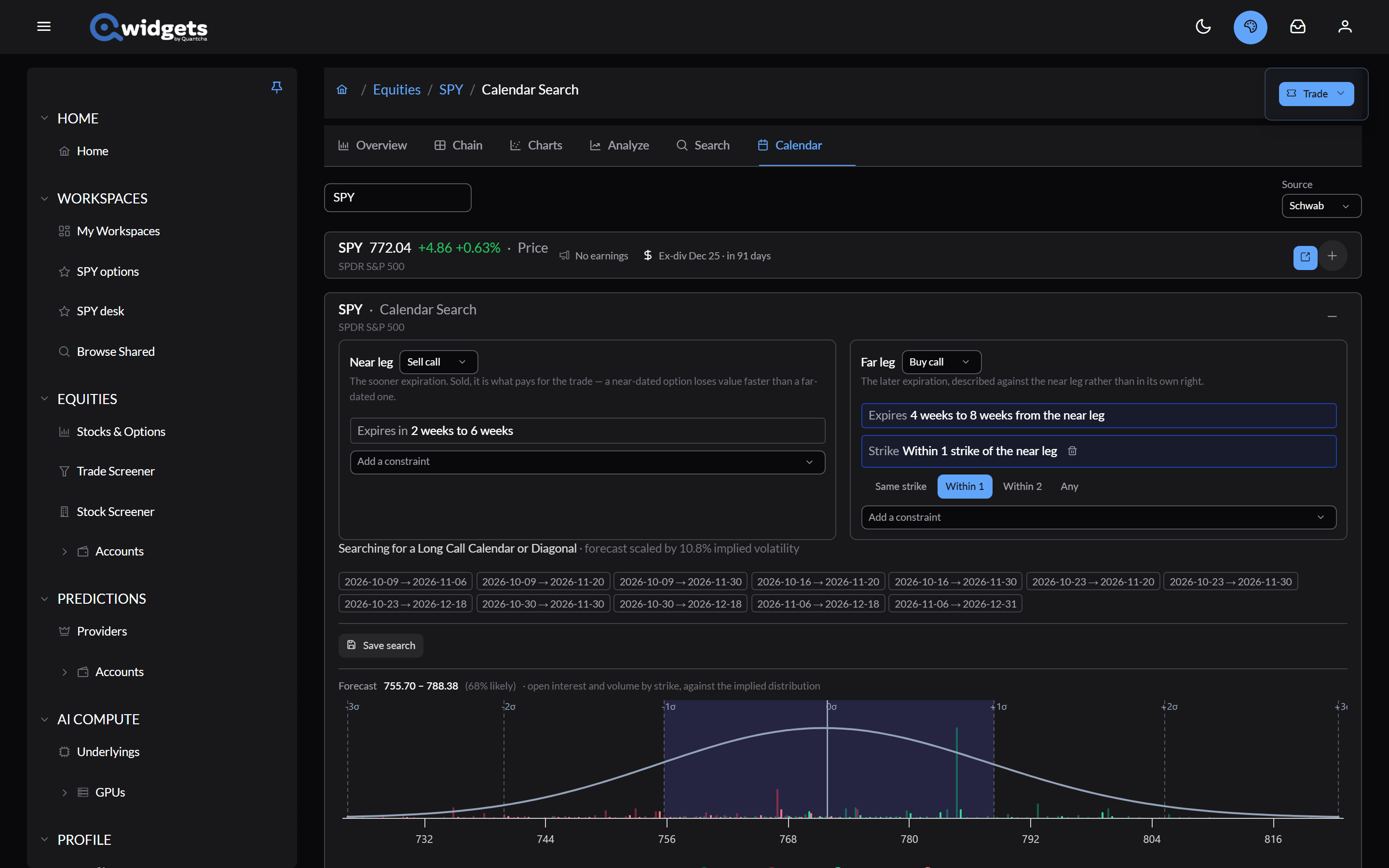
Set up the legs
- Near leg and Far leg: each is Buy call, Sell call, Buy put, or Sell put. The default sells the near call and buys the far call.
- Near leg constraints: Expires in a range of weeks, plus optional Delta or Strike.
- Far leg constraints: Expires a range of weeks after the near leg, and Strike relative to the near leg: Same strike, Within 1, Within 2, or Any. Delta and absolute strike constraints are optional.
The line under the legs names what you’re searching for, such as a long call calendar or diagonal, and the chips list every pair of expirations it covers.
Forecast and ranking
- Forecast: the low and high of where you expect the price to be, shown on the chart against the distribution the market implies.
- Value on: the date trades are valued at; the near expiration by default.
- Rank by: the same measures as Option search.
- Fill assumption and Add filter work as they do there.
The results
Results appear as cards like Option search’s. Analyze opens a spread in Trade analysis. Save search keeps your setup when you’re signed in.