Campaign Journal
Every campaign in a brokerage account has a timeline: how it opened, what you did along the way, and how it ended, with your own notes beside it. Open one by selecting it in the campaign list on Performance, or keep recent ones on a workspace with the Campaign Journal widget.
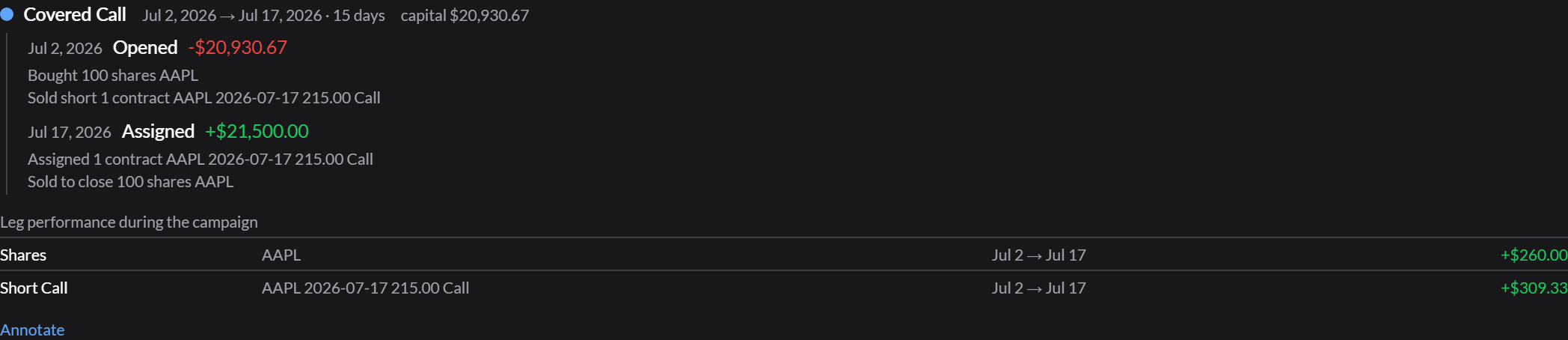
The timeline
- Phases: each stretch the campaign held one strategy, with its dates, length, and the capital at risk.
- Actions within each phase: Opened, Rolled, Scaled up, Adjusted, Assigned, Expired, Closed, with the cash each one moved, and the trades behind it.
- Held now, for an open campaign.
- Leg performance during the campaign: how each leg, such as the shares and the short call, did on its own.
Your notes
Annotate adds your own record to a campaign:
- Note: why you opened it, what you’d do differently.
- Tags, separated by commas, which you can filter by on Performance.
- Opened as: the strategy you meant, if it differs from what Qwidgets recognized.
- Exclude from reporting, to leave a campaign out of Performance’s figures.
On the full page you can also correct a cost basis, split a leg into its own campaign, or merge two campaigns in the same underlying. Notes are saved to your account.
The widget
The Campaign Journal widget lists an account’s recent campaigns, Closed, Open, or All. Expand one to see its timeline and edit its note in place.