Perps
A perpetual future, or perp, tracks an index and never expires. Instead of an expiration, longs and shorts pay each other funding every period, which keeps the perp’s price near its index. Qwidgets lists every perp Kalshi offers, on crypto, metals, stock indices, and oil, so you can follow them beside the rest of your book. No account is needed to browse.
Perps in Qwidgets are on Kalshi. Kalshi quotes every perp per contract: a contract is a fixed slice of the underlying, such as 0.0001 BTC, and its price is that slice’s value in dollars.
Perps Markets
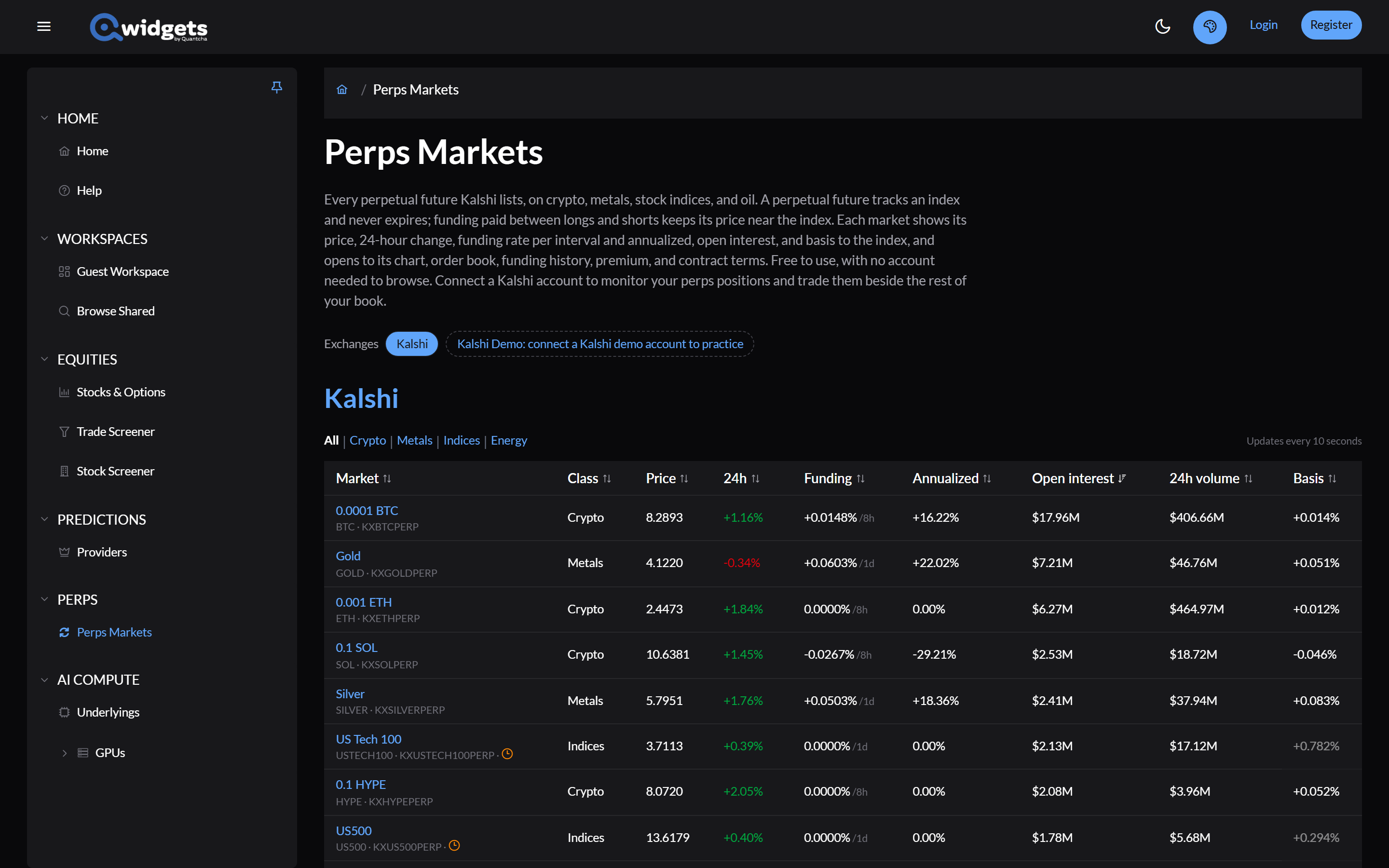
Perps Markets, under Perps in the left-hand menu, lists every market with its:
- Price and 24h change, per contract.
- Funding: the estimated rate for the period in progress, with its interval (such as /8h). Positive means longs pay shorts.
- Annualized funding: the rate times the number of funding periods in a year, without compounding.
- Open interest and 24h volume, in dollars.
- Basis: how far the price sits above or below the index.
Filter by asset class (Crypto, Metals, Indices, Energy) above the table, and sort by any column. With a connected Kalshi account the table streams live; otherwise it updates every 10 seconds.
A clock beside a market’s name means its index is stale: the market is open, but the index hasn’t updated for more than 15 minutes. That happens when the index’s own source is closed while the perp keeps trading, such as a stock index after the market close. Basis is dimmed until the index updates, because it’s measured against the index.
If you’ve connected a Kalshi Demo Account, Exchanges above the table switches between Kalshi and Kalshi’s demo exchange. The demo exchange has its own prices and order books, separate from Kalshi’s real one. Until you’ve connected one, the same spot links to connecting it.
A market’s page
Select a market to open its page:
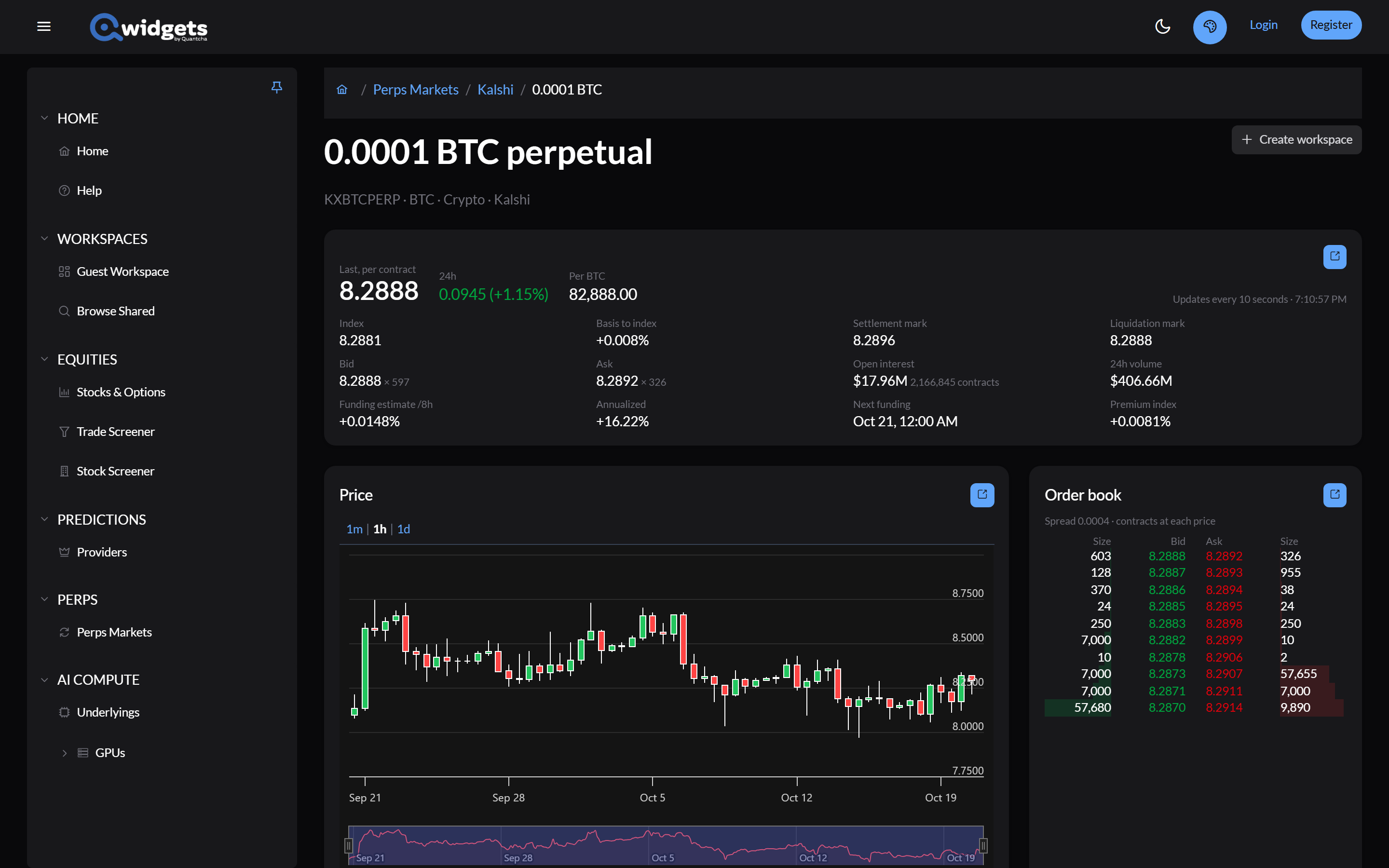
- The quote: the last price per contract and its day’s change, the price per unit of the underlying, the Index, Basis to index, the Settlement mark and Liquidation mark, the best Bid and Ask, open interest, volume, the Funding estimate and its annualized rate, Next funding, and the Premium index.
- Price: candles at one-minute, one-hour, or one-day intervals.
- Order book: bids beside asks, with the spread and the contracts at each price.
- Funding history: settled funding rates over 7, 30, or 90 days.
- Premium to index: the last hour of the perp’s premium over its index, the input its funding rate is averaged from.
- Contract specs: contract size, tick size, trading hours, the funding schedule and cap, and Kalshi’s leverage estimate.
Kalshi fires liquidations and exit triggers on the liquidation mark, not on the last trade. The settlement mark is what it settles variation margin against.
When the index is stale, the page says Index stale since and the time, and dims basis, the premium index, and the premium chart.
Create workspace starts a workspace with the market’s widgets, and the button beside each panel adds that panel to a workspace you already have. With a connected Kalshi account, Trade opens the market’s trade page; see Trade perps.
Widgets
The perps widgets are under Perps Data and Perps Account when you add a widget to a workspace. The data widgets need no account: Perps Markets, Perp Quote, Perp Price Chart, Perp Order Book, Perp Funding, Perp Premium to Index, and Perp Contract Specs. The account widgets need a connected Kalshi account; they’re listed on Your perps portfolio and Trade perps.
The ⋮ menu on every perps widget adds a related widget for the same market, or opens its market page, trade page, or portfolio.
In this section
- Your perps portfolio: positions by subaccount, margin, funding, and P&L.
- Trade perps: the ticket, brackets and trailing stops, and managing orders.
Connecting Kalshi, including its demo exchange, is covered under Kalshi account. How the estimates are made is on Disclosures & Model Limits.